MyNovant
- 4.3
- Rating
- 100.00K
- Installs
- Free
- Price

 Analysis by App-foxy
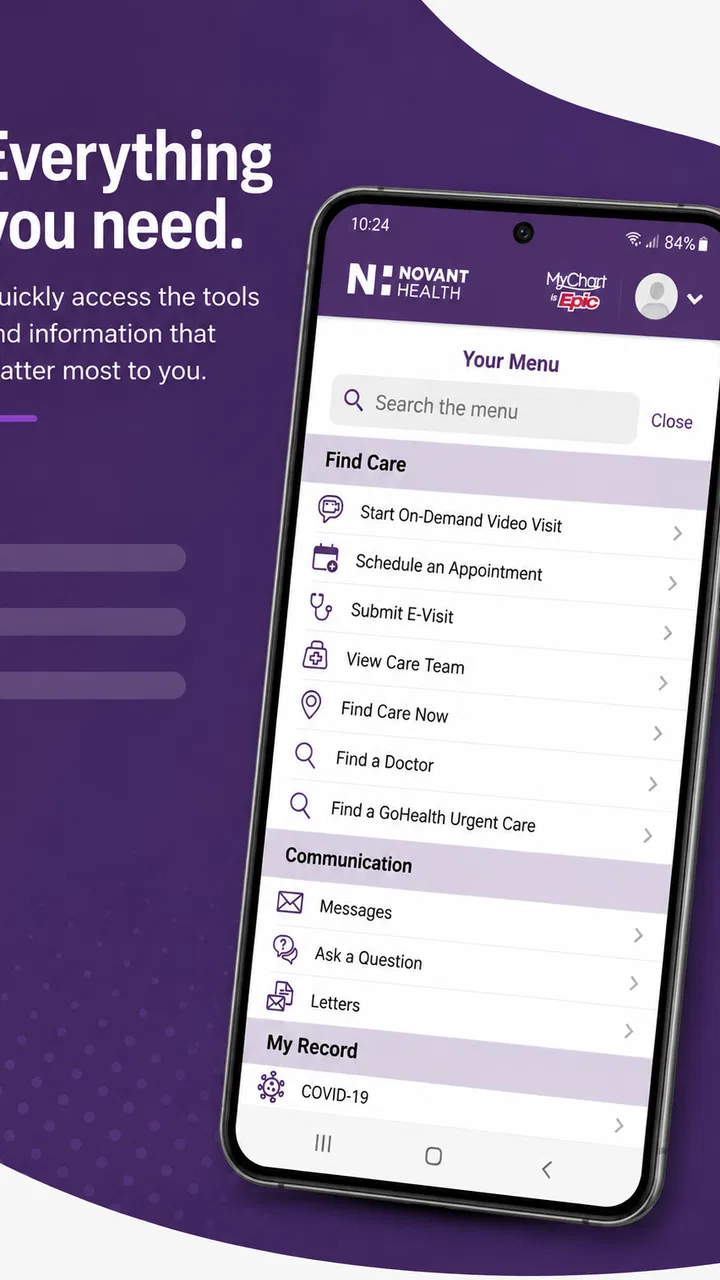
MyNovant is the kind of medical app I would keep for practical moments rather than open for entertainment. Developed by Novant Health, it brings several patient tasks into one place, including checking test results, arranging appointments, and staying connected with care. I found its value less in flashy design and more in reducing the number of calls, paper notes, and separate reminders involved in ordinary healthcare.
That convenience depends on one important condition: you need to be using Novant Health services and have the right patient access set up. If you are outside that care network, this is not a general medical tracker or a replacement for your doctor’s office. For the intended patient, though, it can turn a stressful administrative chore into something manageable from a phone.
Where MyNovant Can Feel Difficult at First
The first point where I would expect users to hesitate is access. A healthcare app is not like a shopping app where you can simply create an account and start browsing. Your identity, patient record, and connection to the provider all matter. If the sign-in process does not immediately lead to the information you expect, that does not necessarily mean the app is broken; it may indicate that the account details and the health system’s records are not lining up yet.
You May Also Like

 Blood Strike: 2.5 Anniversary
Blood Strike’s Loadouts Turn Every Drop Into a Tactical Gamble
A close look at Blood Strike’s custom loadouts: how fast access to signature weapons reshapes its battle royale rhythm, rewards preparation, and narrows the gap between fights.

 Pandora - Music & Podcasts
Pandora’s Music Is Easy to Start, but Harder to Recover
Pandora’s strength is its low-effort path from a seed to a station. Its weak spot is how much confidence it asks you to place in connection, setup, and quiet recovery.

 8 Ball Pool
 Is Built on Rivalries, Rematches, and Routine
A close look at the rivalries, rematches, shared routines, and unanswered safety questions that turn a quick pool match into a persistent mobile community.

 Samsung Music
’s Quiet Strength Is Playing What You Already Own
Its reach comes less from spectacle than from dependable access to a personal library. That simplicity is both the app’s strongest retention engine and its ceiling.

 AccuWeather: Weather Radar
AccuWeather Review: A Quick, Clear Forecast for Everyday Decisions
For everyday plans, the best forecast is the one you can understand quickly. AccuWeather makes rain timing, radar, and local conditions easy to act on, with a few trade-offs.

 Hill Climb Racing
Why Hill Climb Racing Still Turns Crashes Into One More Run
A tiny car, a bumpy hill and one more upgrade: Hill Climb Racing keeps resurfacing because its simple chaos makes every near-miss feel personal.
More From Our News Desk



I also think expectations can create unnecessary frustration. MyNovant is designed around Novant Health care, so its usefulness is tied to that relationship. It is not the right download for someone looking for broad symptom explanations, medication reminders from multiple providers, or a universal health-record organizer. Those needs are better served by a general health tool or by the separate patient systems used by other hospitals.
The app’s store summary focuses on test results, appointments, connection, and staying well. In daily use, those tasks are meaningful because they often arrive at inconvenient times. A result may need attention while you are away from a computer, or an appointment may need to be checked while you are arranging work and transport. The benefit is not that the app replaces care; it is that it gives you a more direct route to parts of your existing care relationship.
MyNovant is free, which removes a major barrier for patients deciding whether to try it. It is rated for Everyone, and the current version is 7.2.0. The app first appeared on November 19, 2020, and its presence on Android has grown to over one hundred thousand installs. Its average rating is 4.3, based on around seven hundred ratings, with over three hundred written reviews. I read those figures as a sign of useful day-to-day value, while remembering that healthcare apps can feel very different depending on the patient’s account and provider relationship.
Why a missing result may not be an app failure
Test results are a good example of this distinction. When something is not visible, it may be because the care team has not released it, the result belongs to another facility, or the wrong patient account is open. Repeatedly refreshing the same screen is unlikely to solve those situations. I would first check the appointment or care location connected to the result, then contact the relevant office if the information is time-sensitive.
The same applies to appointments. A visit arranged by phone, a visit associated with a different department, or an appointment that has changed recently may not behave exactly like a scheduled visit you created through the app. I would use the app as a convenient view of the care relationship, not as the only record of a critical appointment. For anything involving preparation instructions, arrival time, or urgent changes, the clinic’s direct message or phone channel remains the safer confirmation.
Setup Checks That Prevent Most Early Friction
I would begin setup when I have a stable internet connection and enough time to complete the process without rushing. Medical access is not something I like to troubleshoot while standing in a queue or trying to get ready for an appointment. Downloading the free app is only the easy part; the useful experience starts when the correct patient identity and healthcare connection are in place.
Before deciding that the app is failing, I would check four basics:
- Confirm that I am signing in with the account connected to my Novant Health care.
- Make sure I am using the current version available for my device.
- Check that the phone has a reliable connection before loading results or appointment information.
- Close and reopen the app after completing an account or appointment change.
These are simple checks, but they matter more in a medical app than in an ordinary utility. A stale screen can make a patient think a result is absent when the page simply has not refreshed. A weak connection can interrupt a sign-in step and leave the user unsure whether the action worked. I would avoid tapping the same action repeatedly, especially when arranging an appointment, because uncertainty can lead to duplicate attempts or unnecessary confusion.
Device compatibility is another practical point. The Android version requires Android 11 or later, so anyone using an older phone should check the operating system before spending time on installation. If the device cannot meet that requirement, the better choice is to use another supported route to Novant Health care rather than treating repeated installation attempts as a software fault.
Prepare the information you will need
For a smoother first session, I would have my patient details and the contact information associated with my care available. I would also make sure I can access the email address or phone number used for account verification if the sign-in process asks for it. This is not about creating a separate medical history inside the app; it is about avoiding a situation where the account can be downloaded but not properly connected to the patient record.
I would also decide what I want to accomplish before opening the app. If I only need to check a result, I would go directly to that area instead of changing unrelated account settings. If I need an appointment, I would first know the general type of visit and my availability. Clear intent makes the app easier to judge because it separates a navigation problem from a care-access problem.
Privacy is worth handling deliberately. I would use the app on my own device or a trusted device, avoid leaving a medical screen open in public, and sign out or use the device’s normal security protections when appropriate. I would not send sensitive health details through an informal channel simply because the app screen was inconvenient. The safest workflow is the one that keeps personal information inside the official care path.
What to do when the screen looks incomplete
If the app opens but a section appears empty, I would first navigate away and return once, then restart the app. I would also check whether the information I want belongs to Novant Health rather than another clinic, laboratory, or hospital system. This distinction is easy to overlook after a busy day, especially when several providers are involved.
If the issue continues, I would record the useful details before contacting support or the care team: the task I was attempting, the screen that failed to load, and whether the problem affected only one item or the entire account. That description is much more helpful than saying only that “the app does not work.” It can help identify whether the problem is account-specific, appointment-specific, or a broader technical issue.
Recovering a Healthcare Workflow Without Losing Track
The strongest way to use MyNovant is as part of a small personal workflow. I would not rely on memory alone after booking a visit or waiting for an important result. Instead, I would check the app, note the relevant appointment or message details in my normal calendar if needed, and keep the clinic’s contact route available for anything that requires confirmation.
Imagine that I have a busy workday and need to verify an upcoming visit. I can open MyNovant to review the appointment information instead of searching through old emails or calling the office immediately. If the details are present and clear, that saves time. If something looks wrong, I have a specific starting point for contacting the clinic. The app is useful in both cases because it narrows the uncertainty.
For test results, I would use a similar approach. I would check the result, read any accompanying information carefully, and avoid treating the number or status as a diagnosis. A patient portal can show information, but interpretation belongs with the healthcare professional when the result is confusing, unexpected, or connected to symptoms. The app helps with access; it should not encourage self-diagnosis.
One less obvious advantage is that a central patient app can make preparation easier. Before an appointment, I can review what is already visible in my care record and identify questions while I still have time to ask them. That is more useful than opening the app only after the visit, when I may have forgotten what concerned me. I would use it as a preparation tool, not merely as a place to look for results.
Recovering from a failed appointment attempt
If an appointment action does not finish, I would first check whether the appointment actually appeared before trying again. A delayed confirmation can make it seem as though nothing happened. If there is no clear confirmation, I would avoid assuming that a slot is reserved. I would then retry once after restarting the app or use the clinic’s direct scheduling route when timing matters.
This is where MyNovant may be less convenient than speaking with a person. An app can present available choices efficiently, but it may not explain every scheduling exception or special requirement. If I need to describe a complicated medical reason, coordinate several services, or ask whether a particular clinician is appropriate, a phone conversation may be better. The app is strongest when the task is straightforward and the patient already understands what kind of visit is needed.
When a result or message needs human follow-up
I would not use the app as an emergency channel. If I have severe or rapidly worsening symptoms, I would seek appropriate urgent or emergency care rather than waiting for a portal response. Likewise, if a result worries me, I would contact the relevant care team instead of repeatedly refreshing the screen or searching for an interpretation online.
That limitation is not a flaw unique to MyNovant. It is a basic boundary of patient portals. Their job is to improve access to information and routine communication, not to provide immediate clinical judgment. Understanding that boundary makes the app more useful because it prevents a convenient tool from being used for a situation it was never meant to handle.
When the App Is Not the Cause
Healthcare technology sits between several systems: the phone, the internet connection, the patient account, the provider’s records, and the clinic’s workflow. A problem in any one of those areas can look like an app problem. If only one result is missing, I would suspect the record or release process before assuming the whole application is failing. If every section fails to load, I would look at connectivity, account access, and the app version first.
It is also possible for a clinic-side delay to appear as a technical delay. A newly completed test may need processing or review before it becomes visible. An appointment may have been changed by staff but not yet reflected in every connected view. In those cases, reinstalling the app is unlikely to help. I would contact the care location when the information affects preparation, medication, travel, or another decision that cannot wait.
Reinstallation should be a later step, not the first response. Removing an app can interrupt a workflow without fixing an account-side issue. I would restart the phone, confirm the operating system requirement, check the connection, and try again before taking more disruptive action. If access remains blocked, I would use Novant Health’s official support or care-contact route and explain exactly what happened.
Another important distinction is between a technical error and an unfamiliar medical result. A result can be displayed correctly and still be difficult to understand. I would not treat a confusing value, status, or message as proof that the app has mixed up my information. I would verify the patient context and then ask the healthcare team for an explanation. That approach is slower than guessing, but much safer.
Who will get the most from MyNovant
I think the app is a good fit for Novant Health patients who regularly need quick access to appointments and test information. It is especially practical for people who dislike phone queues, manage several visits, or want to check care details while away from a desktop computer. Family members helping another adult may also appreciate having a consistent digital route, provided the account and access arrangements are handled appropriately.
It is less suitable for someone who wants one app to combine records from unrelated healthcare providers. It is also not ideal for a person who rarely uses a smartphone, has an unsupported older device, or prefers every appointment discussion to happen by phone. In those situations, the usual alternatives—calling the clinic, using a desktop patient portal, or speaking with the care team directly—may be more comfortable and sometimes more capable.
Compared with a general health app, MyNovant offers a narrower but more relevant purpose: it connects the patient to Novant Health tasks rather than trying to track every aspect of personal wellness. Compared with a phone call, it is faster for checking routine information but weaker when the situation needs explanation, judgment, or exceptions. That trade-off defines the experience better than any list of features.
My Practical Verdict After Using It
MyNovant is most valuable when I treat it as a patient-access tool, not as a substitute for care. Its free availability, focused medical purpose, and direct connection to Novant Health make it worth installing for patients already using that health system. Checking results and appointments from one place can remove small sources of stress, particularly during busy weeks when finding a phone number or tracking paper instructions is inconvenient.
My recommendation comes with a setup warning: the first session may require patience, and an empty screen does not always mean the application is at fault. Confirm the account, device requirement, connection, and care location before repeating actions. When something remains unclear, save the details of the problem and contact the appropriate clinic rather than guessing.
I would recommend it to a Novant Health patient who wants a convenient digital view of routine care and is comfortable handling basic account troubleshooting. I would skip it if I needed a universal medical organizer, urgent medical advice, or access to records from several unrelated providers. For its intended audience, however, the app does a useful job: it makes ordinary healthcare administration easier while leaving clinical decisions where they belong—with the patient and the care team.
FAQs for MyNovant
01What is MyNovant and what can I use it for?
MyNovant is the official patient app for Novant Health users. After signing in, you can generally review parts of your medical record, manage appointments, communicate with care teams, request prescription refills, view test results, and handle certain billing or insurance tasks. Available features may vary depending on your Novant Health location, provider, account type, and whether your records are connected correctly.
02How do I sign in to MyNovant or create an account?
You typically sign in with your Novant Health MyChart credentials rather than creating a completely separate app profile. New users can usually register through the app or the Novant Health website using an activation code, personal information, or an identity-verification process. If you forget your username or password, use the recovery options provided on the login screen. Support may be required if verification fails.
03Can I schedule appointments and communicate with my doctor through MyNovant?
In many cases, MyNovant lets you request or schedule eligible appointments, review upcoming visits, receive reminders, and cancel or reschedule when the option is available. The app may also provide secure messaging with participating doctors, nurses, or office staff. Appointment types, messaging availability, response times, and scheduling rules depend on your provider and the department involved.
04Can I view test results, medications, and medical records in MyNovant?
MyNovant can provide access to selected health information, including laboratory results, visit summaries, allergies, medications, immunizations, and parts of your clinical record. Results may appear only after they are released according to Novant Health policies, and some information can be delayed or excluded. You should discuss confusing or concerning results with a qualified healthcare professional instead of relying only on the app.
05Is MyNovant free, secure, and suitable for medical emergencies?
The MyNovant app is generally available at no additional charge, although normal mobile data or internet costs may apply. It uses account authentication and security measures intended to protect health information, so you should keep the app updated, use a strong password, and avoid sharing login details. MyNovant is not an emergency service; call emergency services or go to the nearest emergency department for urgent care.
Pros
- Easy access to appointments
- test results
- and medical records in one place.
- Secure messaging makes it convenient to contact your Novant Health care team.
- Prescription refill requests can be submitted without calling the office.
- Appointment reminders help reduce the risk of missing scheduled visits.
- Supports virtual visits for eligible patients directly from a mobile device.
Cons
- Features are mainly useful for patients receiving care through Novant Health.
- Some results or records may appear only after staff have finalized and released them.
- Video visits require a reliable internet connection and compatible device permissions.
- Login or identity verification can be inconvenient during urgent access needs.
- Some users may find navigation less intuitive after app updates.

MyNovant
Gallery